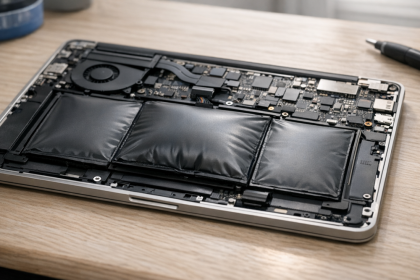
Laptop battery swelling usually means the battery is damaged, aging, overheated, or chemically stressed. It can start as a slightly lifted trackpad, a keyboard that does not sit flat, a warped bottom cover, or a screen that no longer closes cleanly. The uncomfortable part is that the laptop may still turn on, which makes the problem easy to ignore.
It should not be ignored. A swollen lithium-ion battery is not just a shape problem inside the case. It is a sign that gas has built up inside the battery pouch or cells. The safest response is to stop charging, reduce pressure on the device, and plan a careful repair or disposal path instead of trying to squeeze a few more weeks out of it.
This guide is written for normal laptop owners, not repair technicians. It focuses on practical safety decisions: what to stop doing, how to move the laptop, when repair makes sense, and how to reduce the chance of the same problem happening again.
Why Laptop Battery Swelling Happens
Most modern laptops use lithium-ion or lithium-polymer batteries. These batteries are light, rechargeable, and powerful enough for thin portable devices, but they do not like heat, deep stress, physical damage, or poor charging conditions. Over time, chemical reactions inside the battery can produce gas. When that gas has nowhere to go, the battery expands.
Swelling does not always mean the laptop was treated badly. A battery can swell because it is old, because it spent years plugged in at high charge, because the laptop ran hot, because the battery was deeply discharged for too long, or because the battery was damaged by a fall or pressure. Cheap replacement batteries and poorly matched chargers can also increase risk.
The important point is that the visible swelling is usually the final signal, not the first one. The battery may have been degrading for months before the case started to lift. Once the shape changes, the question is no longer whether the battery is perfect. The question is how to handle the device without creating extra heat, pressure, or puncture risk.
Signs That Point to a Swollen Laptop Battery
A swollen laptop battery is not always obvious at first. Some laptops hide the battery under the keyboard deck, while others place it below the trackpad or across the bottom case. Watch for physical changes that were not there before.
- The trackpad feels raised, stiff, or harder to click.
- The keyboard or palm rest has a visible bulge.
- The bottom cover no longer sits flat on a desk.
- The screen lid does not close evenly.
- Small gaps appear between case panels.
- The laptop rocks on a table even though the surface is flat.
- Battery life drops sharply or the laptop shuts off suddenly.
Any one of these signs can have another cause, but a combination of a raised trackpad, warped case, and poor battery behavior should be treated seriously. If the device also feels hot, smells unusual, makes hissing sounds, or shows smoke, move away from it and contact local emergency or fire safety help.
What To Do First
The first step is simple: stop charging the laptop. Unplug the charger from the wall and from the device if you can do so without pressing on the swollen area. Do not keep the laptop plugged in to finish work, download files, or run one more backup. Charging adds electrical and thermal stress to a battery that is already showing a failure sign.
Next, power the laptop down normally if the operating system responds. Do not run heavy apps to drain the battery quickly. Do not stress-test it. Do not try to warm or cool it aggressively. Just shut it down, let it sit on a hard nonflammable surface, and avoid pressing the case back into shape.
If you still need files from the laptop, think carefully before turning it on again. A brief file transfer may feel harmless, but it still uses the battery and generates heat. If the battery is visibly swollen, the better path is usually to have a repair shop remove or disconnect the battery first, then recover the files from the drive if needed.
What Not To Do
The dangerous mistakes with laptop battery swelling are usually physical. People try to flatten the laptop, clamp the case, open the battery pouch, puncture the swelling, or tape the device shut. Those actions can turn a controlled risk into a real fire or injury risk.
- Do not puncture, bend, crush, or press the swollen battery.
- Do not keep charging the laptop to see if it improves.
- Do not put the laptop under books or weight to flatten it.
- Do not open the battery pack itself.
- Do not throw the battery in normal household trash.
- Do not ship the laptop with a swollen battery unless the carrier and repair center explicitly allow it.
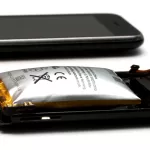
If you have seen guides about phone battery swelling, the same broad rule applies here: swelling means stop using the device and avoid pressure. A laptop is larger and may be easier to place safely, but the battery chemistry concern is similar.
How To Move and Store the Laptop Safely
If the laptop is cool, quiet, and not smoking, move it gently. Hold it from stable edges, not from the bulging area. Place it on a nonflammable surface such as tile, concrete, or a metal tray. Keep it away from paper, bedding, curtains, and other easy-to-ignite material. Do not put it in a sealed drawer or under a pile of items.
If you need to take it to a repair shop, call first. Explain that the battery is swollen and ask how they want the device brought in. A responsible repair shop will usually want the laptop powered off and unplugged, with no pressure on the case. They may also warn against mailing it if the battery is visibly damaged.
For disposal guidance, use official battery recycling or hazardous waste instructions rather than normal trash. The EPA lithium-ion battery disposal FAQ is a good starting point, and Call2Recycle has guidance for damaged, defective, or recalled batteries. Those sources are more useful here than random forum advice because disposal rules and drop-off options can vary by location.
When Repair Makes Sense
Repair usually makes sense when the laptop is otherwise useful, the screen and board are healthy, and a proper replacement battery is available. The key word is proper. A battery should match the laptop model, fit correctly, and come from a trustworthy supplier. A cheap battery that does not fit cleanly can create a new safety problem instead of solving the old one.
Some laptop batteries are easy for a trained technician to replace. Others are glued, hidden under fragile parts, or connected in a way that makes amateur removal risky. If the case is already warped or the trackpad has lifted, there may also be pressure on internal parts. That is why this is not a good moment for improvised repair if you are not comfortable working around lithium-ion batteries.
The cost decision is separate from the safety decision. A six-year-old laptop with a weak screen, broken hinge, and swollen battery may not be worth repairing. A two-year-old laptop with strong performance may be worth a professional battery replacement. Either way, the swollen battery still needs careful handling. Leaving it in a drawer because the laptop is not worth fixing is not a good long-term plan.
How This Connects to Battery Fire Risk
Most swollen batteries do not instantly catch fire. That fact can make people too relaxed. The risk is not that every swollen laptop is about to burst. The risk is that the battery has already moved outside normal condition, and careless handling can make things worse.
The bigger topic is thermal runaway, which is when a lithium-ion battery failure creates heat that feeds more failure. I cover that broader chain in Lithium Battery Explosions: Causes, Thermal Runaway, and Safety Tips. If you want the wider repair, charging, and safety angle, the related guide on lithium-ion battery explosion risks goes deeper into why damaged batteries deserve caution.
For a laptop owner, the practical takeaway is not panic. It is control. Stop charging, stop adding pressure, keep the device away from flammable material, and move toward repair or disposal instead of continued use.
How To Reduce the Risk Next Time
You cannot prevent every battery failure, but you can reduce stress. Heat is one of the biggest enemies. Use the laptop on a hard surface when possible, keep vents clear, and avoid leaving it in hot cars or direct sun. If the fans are constantly loud or the bottom case is always hot, fix the heat problem instead of treating it as normal.
Charging habits also matter. Many laptops now include battery health settings that limit maximum charge or optimize charging when the device stays plugged in. Those features are worth using. Keeping a laptop at 100 percent charge in a warm room for months is not ideal for long-term battery health.
Storage matters too. If a laptop will sit unused for a long time, do not store it completely dead or constantly plugged in. Follow the manufacturer guidance when possible, but a moderate charge and a cool dry place is usually better than a hot closet or a fully drained battery forgotten for months.
Finally, pay attention to early signs. A battery that drains suddenly, heats strangely, or pushes the trackpad out of place is asking for inspection. Waiting until the case is badly distorted makes repair harder and riskier.
A Simple Decision Path
If you are not sure what to do, use a conservative path. First, unplug the laptop. Second, shut it down. Third, move it gently to a hard nonflammable surface. Fourth, decide whether you need a professional repair or responsible disposal. Fifth, avoid shipping or storing it casually until you know the battery handling rules.
If the laptop is hot, smoking, hissing, leaking, or smells sharp or chemical, do not treat it like a normal repair job. Step away from it and follow local emergency guidance. If it is cool and stable, you still should not keep using it, but you have time to plan the next step calmly.
Safety note: this article is general guidance, not a repair manual. Do not open, puncture, crush, or compress a swollen lithium-ion battery. If you are unsure, use a qualified repair technician or local battery disposal service.