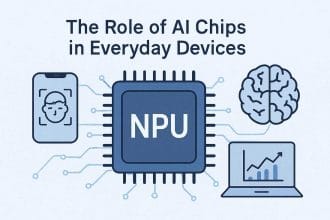
Artificial intelligence used to be this futuristic thing, humming away in massive data centers far, far away. Now, it’s quietly making our everyday devices smarter, faster, and more intuitive. Think about your smartphone instantly enhancing a photo, your laptop filtering out background noise on a video call, or your smart home gadget responding to complex voice commands without a hitch. This isn’t magic; it’s the quiet revolution happening inside your tech, powered by specialized hardware. Specifically, we’re talking about AI processors and the rise of something called the Neural Processing Unit (NPU).
These NPUs are the unsung heroes bringing sophisticated AI capabilities directly to your gadgets. They’re changing how devices handle complex tasks, making them incredibly efficient and much more personal. You don’t need to be a tech expert to understand why this shift matters. It affects everything from your battery life to your privacy, and it’s a big part of how your tech will evolve in the coming years. Let’s peel back the curtain and see what these clever chips are all about.
TL;DR
- AI processors, or NPUs, are specialized chips designed to handle AI tasks super efficiently.
- They enable ‘on-device AI,’ meaning your gadgets can process AI locally, not just in the cloud.
- This shift improves speed, privacy, and reduces power consumption for AI features.
- NPUs are becoming standard in smartphones, laptops, and other smart devices.
- They power features like advanced photography, voice recognition, and real-time translations.
- Understanding NPUs helps you appreciate how modern tech truly works and evolves.
What Exactly Are AI Processors (NPUs)?
For decades, the central brain of any computer has been the CPU (Central Processing Unit). It’s a generalist, great at handling a huge variety of tasks, from running your operating system to opening applications. Then came the GPU (Graphics Processing Unit), originally built to render complex graphics in games and software, but it turned out to be excellent at parallel processing – doing many calculations at once. This made GPUs incredibly useful for early AI work, especially training complex models.
But as AI got more sophisticated, especially for tasks like image recognition, natural language processing, and predictive analysis, even GPUs weren’t perfectly optimized. These AI tasks often involve specific types of mathematical operations, repeated millions or billions of times. Enter the Neural Processing Unit, or NPU.
An NPU is a chip specifically engineered to accelerate machine learning algorithms. Consider it a specialist tool rather than a general-purpose one. While a CPU is like a Swiss Army knife and a GPU is like a high-powered drill, an NPU is like a finely tuned, automated assembly line for AI computations. It’s designed from the ground up to handle the specific kind of math that neural networks rely on, making these operations far faster and more energy-efficient than a CPU or even a GPU could manage for the same task.
Why NPUs are a Big Deal for On-Device AI
The rise of NPUs directly feeds into what we call ‘on-device AI’ or ‘Edge AI Chips’. This means that instead of sending all your data to a distant cloud server for AI processing, your device can handle much of it right there, locally. This shift brings some serious advantages that impact your daily experience:
- Pro-Tip: Faster responses are a key benefit. When AI tasks are processed locally, there’s no internet lag. Your voice assistant can respond almost instantly, or your camera can apply enhancements in real-time, because the data doesn’t have to travel back and forth from a cloud server.
- Pro-Tip: Enhanced privacy is another huge win. Processing data on your device means your personal information – like your photos, voice commands, or typing patterns – doesn’t necessarily need to leave your device to be analyzed by AI. This reduces the risk of data breaches and keeps your sensitive information more secure.
- Common Pitfall: Don’t assume all your device’s AI runs locally. While NPUs increase on-device processing, some complex AI models still require the vast computational power of cloud servers. The goal is a hybrid approach, using NPUs for what they do best and offloading only when necessary.
- Pro-Tip: Better battery life is a direct result of NPU efficiency. These specialized chips are designed to perform AI calculations using significantly less power than a general-purpose CPU or GPU. This means your device can run sophisticated AI features for longer without draining its battery as quickly.
Essentially, NPUs allow your gadgets to be smarter, quicker, and more mindful of your privacy without constantly needing an internet connection or consuming excessive power. It’s about making AI a seamless, integrated part of your device experience, rather than something that feels external or ‘online.’
How AI Processors (NPUs) Work Their Magic
Without getting too technical, NPUs achieve their efficiency by being purpose-built. They’re designed with many tiny processing units working in parallel, which is perfect for the way neural networks operate. Think of a neural network as a series of interconnected layers, each performing simple calculations and passing the results to the next. An NPU excels at running these calculations simultaneously across its many cores.
They often have specialized memory architectures and instruction sets tailored to common AI operations like matrix multiplications and convolutions – the building blocks of most machine learning models. This means they can crunch through these specific types of data operations at incredible speeds using minimal energy. It’s like having a dedicated expressway for AI data, bypassing the regular traffic on the main roads that the CPU and GPU use.
Real-World Impact: Where You’ll See NPUs
NPUs are already a staple in many of the devices you use every day, even if you don’t always realize it. Their presence makes a tangible difference in how your technology performs and what it can do:
- Smartphones: This is arguably where NPUs have had the biggest impact so far. They power advanced camera features like computational photography (think portrait mode, night mode, or semantic segmentation that distinguishes sky from grass), real-time language translation, more accurate voice assistants, and even personalized suggestions for apps and settings.
- Laptops and PCs: Newer laptops are increasingly including NPUs. They enhance video conferencing (background blur, eye contact correction), improve security features like facial recognition, and optimize performance for AI-driven creative applications.
- Smart Home Devices: From smart speakers that understand complex commands to security cameras that can differentiate between a pet and a person, NPUs are making these devices more autonomous and responsive.
- Automotive: In modern cars, NPUs contribute to advanced driver-assistance systems (ADAS) by processing real-time sensor data for features like lane-keeping assist, adaptive cruise control, and object detection.
The common thread here is that NPUs enable more intelligent, immediate, and energy-efficient interactions with our devices, often improving features we already use or unlocking entirely new capabilities.
Common Misconceptions
- NPUs are just a marketing gimmick for expensive devices. While they often appear in premium tech first, NPUs are rapidly becoming a standard component across various price points as the benefits of on-device AI become essential.
- You need an NPU to do any AI tasks on your device. Your CPU and GPU can still handle many AI workloads, especially simpler ones or those that offload to the cloud. However, an NPU offers unparalleled efficiency and speed for dedicated AI processing.
- NPUs are only for professional AI developers or researchers. While they are crucial for those fields, the benefits of NPUs are felt by everyday users through improved camera quality, faster voice assistants, and smarter device performance.
- Having an NPU means your device stores all your data and never connects to the cloud. NPUs enhance on-device processing and privacy, but devices still connect to the cloud for software updates, syncing data, and accessing larger AI models or services.
Next Steps
- Consider Device Specs: When shopping for a new smartphone, laptop, or smart device, look for mentions of an NPU or dedicated AI processor in the specifications. Manufacturers are usually proud to highlight these.
- Explore AI Features: Experiment with the AI-powered features on your current devices. Many newer gadgets already use NPUs for tasks like photo enhancement, voice commands, or intelligent suggestions.
- Stay Informed: Keep an eye on tech news. The NPU landscape is evolving quickly, with new capabilities and applications emerging all the time. Understanding these advancements helps you make informed choices about your technology.