Essential smart home gadgets are not the flashiest devices. They are the ones that solve daily problems: lights that turn off automatically, a thermostat that avoids heating an empty house, a video doorbell that shows who is at the door, sensors that catch leaks early, and plugs that make old lamps easier to control.
The best smart home setup starts small. Pick one problem, choose devices that work together, secure them properly, and expand only when the first devices are actually useful. A smart home should reduce friction, not add five apps, three hubs, and a privacy headache.

What Makes a Smart Home Gadget Essential?
A gadget is essential only if it improves daily life in a way you will keep using. Color-changing lights are fun, but motion lights in a hallway may be more useful. A smart fridge may look impressive, but a leak sensor near a water heater can prevent a much more expensive problem.
Use these filters before buying:
- Problem solved: What annoyance, safety issue, or energy waste does it fix?
- Compatibility: Does it work with your phone, speaker, hub, and existing devices?
- Reliability: Will it still work when Wi-Fi is weak or the cloud service is down?
- Security: Does the brand provide updates, 2FA, encryption, and clear privacy controls?
- Support life: Will the device receive software updates for several years?
- Fallback: Can people still use the light, lock, or thermostat manually?
A Practical Smart Home Starter List
| Device category | Best first use | Buying note |
|---|---|---|
| Smart bulbs or switches | Schedules, motion lighting, bedtime routines, away-mode lighting | Switches are better for fixtures; bulbs are easier for lamps and rentals |
| Smart thermostat | Heating/cooling schedules, remote control, energy reports | Check HVAC compatibility and C-wire needs before buying |
| Video doorbell | Entry alerts, package visibility, visitor communication | Review subscription fees, local storage, privacy zones, and wiring |
| Smart plugs | Lamps, fans, holiday lights, coffee makers, energy monitoring | Do not use with high-load appliances unless the plug rating supports it |
| Leak sensors | Water heater, sink, washing machine, basement, AC drip pan | Low cost and high value because early alerts can prevent water damage |
| Smart speaker or hub | Voice control, routines, device grouping, family reminders | Choose the ecosystem you actually use: Apple, Google, Amazon, or Samsung |
| Robot vacuum | Daily floor maintenance and pet hair control | Check mapping, replacement parts, thresholds, and privacy settings |
1. Smart Lighting
Smart lighting is often the easiest starting point because installation can be simple and the benefit is immediate. Use bulbs for lamps, rental-friendly setups, and color or temperature changes. Use smart switches when you want wall controls to behave normally for everyone in the home.
Useful routines include:
- turning entry lights on at sunset
- dimming lights before bedtime
- using motion sensors for hallways or closets
- turning all lights off with a single bedtime command
- randomizing lights while traveling to make the home look occupied
Do not overbuy. A few carefully placed lights usually produce more daily value than replacing every bulb at once.
2. Smart Thermostats
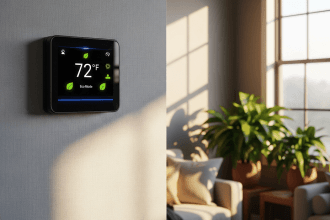
A smart thermostat is one of the few smart home upgrades that can improve comfort and potentially reduce energy waste. It works best if your home is empty for regular periods, your schedule changes, or you often forget to adjust the temperature before leaving.
Before buying, confirm HVAC compatibility, C-wire requirements, heat pump support, and whether your utility offers rebates. ENERGY STAR says certified smart thermostats can save energy in many homes, but savings depend on real usage and setup. For a deeper look, read our guide to smart thermostat savings.
3. Video Doorbells and Cameras
Video doorbells are useful for deliveries, visitors, and entry awareness. Indoor and outdoor cameras can also help, but they create privacy responsibilities. A camera records more sensitive data than a smart bulb, so the security and storage model matters.
Check these details:
- cloud subscription costs
- local storage options
- privacy zones
- two-factor authentication
- motion detection controls
- how long recordings are kept
- whether household members and guests are comfortable with placement
A camera should cover practical security areas, not private spaces. Bedrooms and bathrooms should stay camera-free.
4. Smart Plugs and Energy Monitors
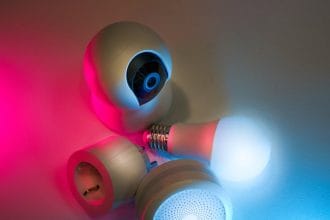
Smart plugs are small but useful. They can schedule lamps, control holiday lights, turn off hard-to-reach outlets, and monitor energy use on some models. They are also a low-cost way to test whether you like home automation before buying expensive devices.
The safety rule is simple: match the plug to the load. Do not use a small smart plug with space heaters, large appliances, power tools, or anything that exceeds the plug’s rating. If a device produces heat, use extra caution and follow the appliance manufacturer’s instructions.
5. Leak Sensors and Safety Sensors
Leak sensors are easy to overlook because they are not exciting. They are also among the most practical smart home gadgets. Put them near water heaters, washing machines, dishwashers, under sinks, behind toilets, in basements, and near HVAC drain pans.
Smart smoke and carbon monoxide alarms can also be useful, but life-safety devices should be selected carefully and installed according to local codes and manufacturer instructions. Do not rely only on app alerts. Physical alarms, batteries, and proper placement still matter.
6. Smart Speakers and Hubs
A smart speaker or hub can make the whole system easier by controlling lights, plugs, thermostats, routines, music, reminders, and compatible devices from one place. It can also become the privacy center of the home, so configure it carefully.
Turn off unnecessary voice purchasing, review voice history settings, create separate household profiles when useful, and avoid placing always-listening devices where private conversations are most sensitive. Convenience is valuable, but default settings are not always the best privacy settings.
Matter, Thread, Wi-Fi, Zigbee, and Z-Wave
Compatibility is one of the biggest smart home problems. The Connectivity Standards Alliance describes Matter as an IP-based connectivity standard intended to improve interoperability, reliability, security, and compatibility across smart home devices.
In simple terms, Matter can help devices from different brands work together more easily. Thread is a low-power mesh network used by some Matter devices. Wi-Fi is common and simple but can crowd your router if you add many devices. Zigbee and Z-Wave are older but still common in many hubs and sensors.
When buying new devices, look for Matter support if it fits your ecosystem. But do not assume every Matter device supports every feature in every app. Check the exact device type, hub requirement, and supported platforms before buying.
Security and Privacy Checklist
CISA warns that IoT convenience comes with privacy and security risk because connected devices share data and can be targeted if poorly secured. NIST research on smart home privacy also notes that consumers often lack clear information and control over privacy and security settings.
Use this checklist before adding devices:
- Use strong, unique passwords for device accounts.
- Enable two-factor authentication where available.
- Update firmware and apps regularly.
- Change default device names that reveal private information.
- Use a guest or IoT network if your router supports it.
- Review camera, microphone, and location permissions.
- Delete old devices from your account before selling or giving them away.
- Avoid brands that do not explain update support or privacy practices.
For broader online safety habits, see our guide to protecting your digital presence.
What Not to Buy First
Skip expensive smart appliances until you know you will use the features. A smart washer, fridge, oven, or coffee machine may be useful for some people, but these devices are harder to justify if the app features are minor or the product may stop receiving updates before the appliance wears out.
Also avoid buying devices only because they are discounted. The cheapest smart plug or camera may become expensive if it has poor security, no updates, unreliable app support, or subscription features you did not expect.
Buy the Gadget That Fixes a Repeated Failure
A smart home gadget is essential only when it removes a real repeated problem. A plug that turns off a forgotten heater, a leak sensor under a sink, or a thermostat that avoids waste has a clearer job than a device bought because it looks futuristic.
- Safety problem: leak sensors, smoke/CO alerts, and reliable notifications come first.
- Energy problem: thermostats, smart plugs, and energy monitors should point to a measurable change.
- Convenience problem: lighting and routines should remove friction, not add another app to manage.
- Privacy problem: cameras and speakers need account security, update support, and clear placement rules.
- If solar, batteries, or controls are involved, compare the device with smart home renewable energy choices.
- For cameras, speakers, and hubs, use smart home privacy as the safety check.
Bottom Line
The most essential smart home gadgets are usually lighting, thermostat control, video doorbell or camera coverage, smart plugs, leak sensors, and a hub or speaker that ties the system together. Start with one problem, buy compatible devices, secure them, and build slowly.
A good smart home is practical, reliable, private, and easy for everyone in the household to use. If a device makes daily life easier and still works safely when the app is unavailable, it belongs on the shortlist.
Sources: Connectivity Standards Alliance on Matter; CISA IoT security guidance; NIST smart home privacy and security research; ENERGY STAR smart thermostat guidance.
Before adding more devices, compare them against smart home energy savings so convenience does not quietly raise standby power use.
Before buying one as a gadget, check the practical smart thermostat savings guide so the device matches your HVAC system, schedule, and comfort limits.