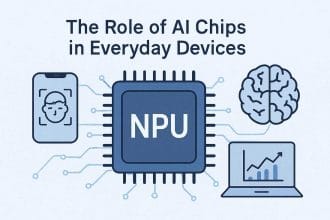
AI is everywhere now, from smart assistants helping you organize your day to advanced photo editing on your phone. But to make AI truly useful and incredibly fast, especially right on your laptop or smartphone, we need specialized tools. That’s where Neural Processing Units, or NPUs, come in. Think of them as the new brain for AI, a type of dedicated AI hardware designed from the ground up to handle the specific kind of number crunching AI needs. They’re making our everyday devices smarter and quicker, often without needing to constantly talk to the internet cloud.
TL;DR
- NPUs are specialized computer chips built specifically for AI tasks.
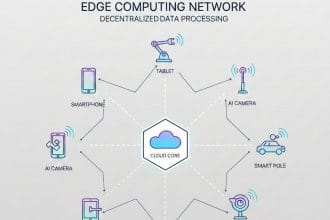
- They allow AI to run directly on your devices, a concept known as Edge AI computing.
- This on-device processing makes AI faster, more private, and functional even offline.
- NPUs complement, rather than replace, traditional CPUs and GPUs by handling AI workloads more efficiently.
- They are a key component for the future of smart devices, autonomous vehicles, and advanced personal computing.

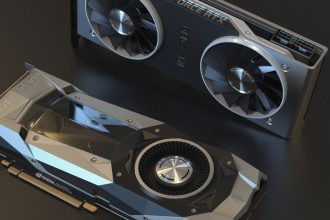
For decades, general-purpose computer chips like Central Processing Units (CPUs) did most of the heavy lifting. Then, Graphics Processing Units (GPUs) emerged, great at parallel processing, making them surprisingly good at training complex AI models. But AI’s needs are growing. Training AI is one thing, but running it quickly and efficiently on your actual device – that’s another challenge. This is where the specialized world of Neural Processing Units takes center stage.
NPUs represent a significant leap in AI chip architecture. Unlike a CPU that’s a jack-of-all-trades, or a GPU optimized for graphics and general parallel tasks, an NPU is purpose-built for the repetitive, matrix-multiplication heavy computations that neural networks thrive on. Imagine a factory line designed to build only one specific type of car, compared to a general factory that builds everything from bikes to trucks. The specialized factory will always be more efficient for its specific product.
This efficiency translates into real-world benefits. Devices equipped with NPUs can process AI tasks much faster while consuming less power. This is crucial for Edge AI computing, where intelligence moves from distant cloud servers right to your device – your phone, your smart speaker, your car. It means your smart assistant responds quicker, your camera recognizes faces faster, and sophisticated apps can run AI features without lag.
The core difference lies in how NPUs are designed to accelerate machine learning algorithms. They feature specialized circuitry and memory configurations tailored to the unique demands of neural networks. This dedication to AI means they can perform AI calculations with incredible speed and power efficiency, outperforming CPUs and even GPUs for specific inference tasks (which is what happens when an AI model processes new data to make a prediction or perform an action). If you’re curious about the technical distinctions, understanding the differences in design and function between an NPU vs GPU can be quite insightful.
- Pro-Tip: When buying a new smartphone or laptop, check if it has a dedicated NPU. This indicates better performance for AI-driven features like advanced camera processing, voice commands, and power management.
- Common Pitfall: Don’t expect an NPU to magically make all your old software faster. Its benefits are most apparent in applications specifically designed to leverage its AI processing capabilities.
Real-World Impact of Neural Processing Units
So, how does this specialized hardware affect you directly? NPUs are already quietly enhancing many devices and services you use every day, often without you even realizing it. The move towards more on-device intelligence, facilitated by NPUs, is profound.
Take your smartphone, for example. The advanced camera features – portrait mode with sophisticated background blur, real-time scene recognition, or super-resolution image enhancement – are all powered by NPUs. They enable these complex computations instantly, right when you snap the photo, making professional-looking results effortless. Voice assistants on your phone or smart speaker understand your commands faster and more accurately because the voice recognition models are processed locally by dedicated AI hardware. This reduces latency and improves responsiveness.
In laptops, NPUs are beginning to support features like advanced video conferencing tools that can automatically frame you, blur your background without impacting performance, or even apply subtle eye-contact correction. They also play a role in optimizing battery life by offloading AI tasks that would otherwise drain the main processor. For those interested in privacy, Edge AI computing is a great help because your data stays on your device for processing, rather than being sent to a cloud server, making AI more secure and personal.
Beyond personal gadgets, NPUs are fundamental to the future of transportation. Self-driving cars rely on these specialized chips to process vast amounts of sensor data – from cameras, radar, and lidar – in real-time, making instantaneous decisions about navigation and safety. They are the brains that allow a car to ‘see’ and ‘understand’ its surroundings, enabling features like adaptive cruise control, lane-keeping assistance, and in the end, fully autonomous driving.
- Pro-Tip: Look for device specifications that mention ‘AI acceleration’ or ‘neural engine’ as indicators of NPU presence. This is particularly relevant for creative professionals and power users who deal with AI-intensive applications.
- Common Pitfall: Assuming all ‘smart’ features are equally efficient. Without an NPU, some AI tasks might still rely on less efficient general-purpose processing, leading to slower performance or higher power consumption.
Common Misconceptions
- NPUs are just a marketing gimmick: While the term might be new, the technology behind NPUs is a serious architectural shift to improve AI performance and efficiency, not just a buzzword.
- NPUs will replace CPUs and GPUs: Not at all. NPUs are specialized co-processors designed to complement CPUs and GPUs by handling specific AI tasks, allowing the other chips to focus on what they do best. They work together.
- You need an NPU only for ‘advanced’ AI: While crucial for complex AI, NPUs are increasingly optimizing everyday tasks, from improving photo quality to making your device’s battery last longer by handling background AI processes efficiently.
- All AI tasks need an NPU: Many simpler AI tasks still run perfectly fine on traditional CPUs and GPUs. NPUs shine with specific types of neural network workloads, especially for inference at the edge.
Next Steps
Understanding NPUs helps you make more informed decisions about your tech purchases and appreciate the behind-the-scenes magic that powers our increasingly intelligent devices. Here’s what you can do:
- Check Device Specs: When shopping for new phones, tablets, or laptops, look for mentions of ‘Neural Engine,’ ‘AI Processor,’ or ‘NPU’ in the specifications. This indicates better future-proofing for AI-powered features.
- Explore AI Applications: Experiment with apps that leverage on-device AI. Notice how much faster and more responsive features like real-time language translation, advanced photo editing, or intelligent search have become.
- Stay Informed: The world of AI hardware is evolving rapidly. Keep an eye on tech news to see how AI chip architecture continues to innovate and what new capabilities dedicated AI hardware brings to consumers.
- Consider Privacy: Appreciate how Edge AI computing, enabled by NPUs, can enhance your data privacy by keeping more of your personal data processed locally on your device.