The digital banking shift is the move from branch-centered banking to mobile apps, online accounts, instant alerts, digital wallets, connected budgeting tools, and faster payment experiences. For many people, the phone is now the main bank branch.
That shift can make money easier to manage. It can also create new risks around data sharing, scams, account access, fees, and confusion about which company actually holds your money. Digital banking is useful when it gives you more control without hiding the trust model behind the app.
What Actually Changed
Digital banking used to mean checking a balance online. Now it often includes mobile check deposit, virtual cards, real-time transaction alerts, instant transfers, subscription tracking, automated savings, early pay features, budgeting categories, account aggregation, and fraud controls inside one interface.
The core change is speed. You can see transactions faster, move money faster, freeze a card faster, and compare products faster. But faster also means mistakes and scams can move faster. That is why a good digital banking habit includes verification, not just convenience.
The Main Benefits and Tradeoffs
| Feature | Benefit | Check before relying on it |
|---|---|---|
| Mobile alerts | Spot charges quickly. | Turn on alerts for purchases, transfers, card-not-present charges, and login attempts. |
| Budgeting tools | See spending patterns without manual spreadsheets. | Confirm categories are accurate before making financial decisions. |
| Connected finance apps | View multiple accounts in one place. | Understand what data is shared and how access can be revoked. |
| Instant transfers | Move money quickly. | Verify the recipient because some payments may be difficult to reverse. |
| Digital-only accounts | Lower fees or better app features. | Confirm the bank relationship and deposit insurance status. |
Deposit Insurance Still Matters
A slick app is not the same thing as a bank. Some fintech apps are banks. Some partner with banks. Some provide payment, investing, crypto, or stored-value services that are not the same as insured bank deposits.
The FDIC explains that deposit insurance protects deposits at FDIC-insured banks up to coverage limits, but it does not cover products such as stocks, bonds, mutual funds, annuities, life insurance, municipal securities, or crypto assets. Check the official FDIC deposit insurance guidance before assuming app balances are protected.
For app-based banks specifically, this connects to neo-banking technology.
Open Banking and Data Rights
One major part of the digital banking shift is account connectivity. Budgeting apps, lending tools, tax software, and financial dashboards often rely on access to bank data. The benefit is convenience. The risk is oversharing.
The CFPB finalized a personal financial data rights rule intended to give consumers more control over financial data sharing and competition in financial services. For users, the practical habit is simple: connect only apps you trust, review permissions, and revoke access when the app is no longer needed.
Security Habits for Digital Banking
Digital banking security is not only the bank’s job. Users control several high-impact settings:
- Use a password manager and unique password for each financial account.
- Turn on multi-factor authentication, preferably not SMS when stronger options are available.
- Enable transaction and login alerts.
- Keep banking apps updated.
- Do not click banking links from texts or emails. Open the app or type the address directly.
- Review connected apps and revoke old permissions.
- Keep emergency contact information current so fraud alerts reach you.
Digital wallet habits overlap with banking safety. See digital wallet security for a broader security checklist.
When Digital Banking Is Not Enough
Digital banking is efficient for everyday transactions, but there are times when a branch, phone support, or a human specialist matters: estate accounts, fraud recovery, business lending, mortgage issues, large transfers, international complications, or accessibility needs.
The best setup may be hybrid. Use digital tools for routine visibility and speed, while keeping access to a financial institution that can solve complex problems when automation fails.
A Safer Digital Banking Setup
The digital banking shift is not only about nicer apps. It changes how people reset access, approve payments, store statements, receive alerts, and prove identity when something breaks. A safer setup assumes that the phone, email account, or app session could fail at the worst possible time.
- Turn alerts into controls: enable transaction, login, card-not-present, and beneficiary-change notifications where the bank supports them.
- Protect the reset path: secure the email address and phone number that can recover the bank account, not just the banking password.
- Keep a fallback route: know how to freeze a card, contact support, download statements, and access money if the app is unavailable.
- Review app permissions: remove old budgeting, open-banking, or payment connections that no longer need account access.
- Separate daily and emergency money: convenience accounts should not be the only place where essential funds live.
This is educational personal-finance security guidance, not banking, legal, or investment advice. Rules, protections, and deposit coverage depend on your country, account type, and provider.
- If a service uses tokenized balances, the risks look different from stablecoins, which depend on issuer reserves, redemption, and market confidence.
Use a Backup Plan Before Going Fully Digital
Digital banking is convenient until an app outage, lost phone, frozen card, fraud review, travel problem, or weak signal blocks access. Before relying on one digital route, keep a backup payment method, know how to contact support, and make sure important records can be downloaded.
- Account access: keep recovery email, phone, password manager, and MFA options current.
- Payment backup: keep at least one separate card, account, or cash option for emergencies.
- Record backup: export statements before tax, rent, loan, or dispute deadlines.
- Fraud response: know where card freeze, dispute, and support tools live before something happens.
This is educational personal finance and security guidance, not financial, legal, tax, or banking advice.
Bottom Line
The digital banking shift can power your money by making it easier to track, move, protect, and plan. The strongest benefits come from real-time visibility, lower friction, and better controls.
Use the tools, but verify the institution, the insurance status, the fees, the data-sharing permissions, and the security settings. A good banking app should make money clearer, not just faster.
Where CBDCs Fit Into Digital Banking
The digital banking shift includes mobile banking, wallets, instant payments, private digital money, and possible central bank systems. To separate those ideas, compare this article with central bank digital currencies explained.
Financial note: This article is for general education and personal research, not financial, investment, tax, or legal advice. Rules and risks change, so check current sources before making money decisions.
Digital Banking Safety Checklist
The digital banking shift is useful only if the account remains recoverable and hard to abuse. I would start with the basics: a strong unique password, app updates, device screen lock, transaction alerts, and a recovery email or phone number you still control. Convenience should not mean every login, transfer, and approval depends on one weak device.
- Turn on alerts: use push, SMS, or email alerts for card activity, transfers, and new payees.
- Review saved devices: remove old phones, browsers, and computers from the account.
- Protect recovery: secure the email account that receives password resets.
- Use limits: set transfer or card limits if the bank allows it.
- Keep support paths: know how to freeze cards or contact the bank if the app stops working.
Fraud Warning Signs
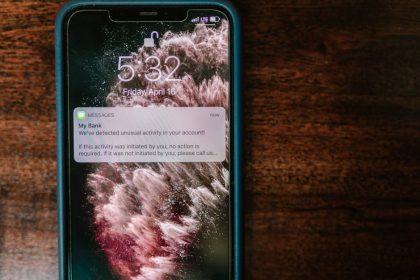
Most digital banking problems do not look technical at first. They look like urgency. A message says your account will close, a caller says they are from fraud support, a link asks you to verify details, or a fake investment page asks for a quick transfer. A real safety habit is to slow the transaction down and open the bank app or website yourself instead of following a link.
This is where digital banking connects to broader account safety. Passkeys, password managers, and device security all matter. My guide to protecting your online presence covers the account hygiene side, while neo-banking technology is useful when comparing app-first banks and support risks.
Financial safety note: This article is educational and not banking, legal, or financial advice. If you suspect fraud, contact your bank through its official app, website, or card number immediately.